Types of Financial & Cyber Frauds

Understanding how fraudsters operate is your first line of defence. These are the most common attack vectors targeting Indian banking customers.

No fraud incidents found for this category.

Active sliders summary: There are a total of 0 items across the website elements.

Spot a Phishing Email

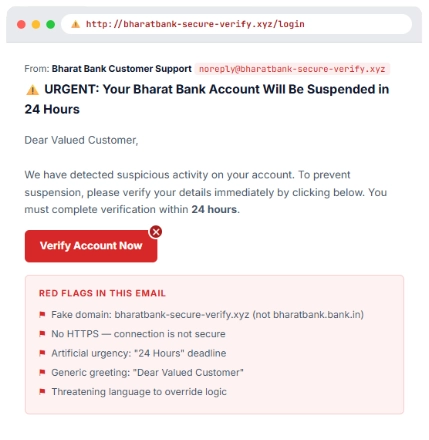
This is what a real phishing attempt looks like. Can you spot the red flags before clicking?

Phishing emails are designed to look legitimate. They often replicate your bank's branding perfectly, creating false urgency to make you act without thinking.

Remember: Your bank will NEVER ask for your OTP, full card number, CVV, or net banking password via email, SMS, or phone call.

The Bank’s primary strategic goal is to achieve sustainable business growth by empowering people of Bharat to achieve their goals and desires and to ensure unbiased banking service is available to all.

Spot a Phishing Email

This is what a real phishing attempt looks like. Can you spot the red flags before clicking?

Phishing emails are designed to look legitimate. They often replicate your bank's branding perfectly, creating false urgency to make you act without thinking.

Remember: Your bank will NEVER ask for your OTP, full card number, CVV, or net banking password via email, SMS, or phone call.

The Bank’s primary strategic goal is to achieve sustainable business growth by empowering people of Bharat to achieve their goals and desires and to ensure unbiased banking service is available to all.
Essential Security Precautions

Follow these practices consistently to significantly reduce your risk of becoming a fraud victim.

01 / PASSWORDS

Use Strong, Unique Passwords

Create passwords with 12+ characters combining uppercase, lowercase, numbers and symbols. Never reuse passwords across banking and social media accounts.

02 / TWO-FACTOR AUTH

Enable 2FA Everywhere

Always enable two-factor authentication on your banking apps, email, and social media. Use an authenticator app instead of SMS-based OTP where possible.

03 / OTP SECURITY

Guard Your OTP Fiercely

OTP stands for One-Time Password — it is yours alone. Never share it with anyone, including callers claiming to be bank staff, RBI officials, or police.

04 / URL VERIFICATION

Always Check the URL

Before entering any credentials, verify the website URL begins with https:// and shows a padlock icon. Banks will never have hyphens or unusual characters in their domain.

05 / UPDATES

Keep Everything Updated

Update your banking apps, operating system, and antivirus regularly. Outdated software contains known vulnerabilities that criminals actively exploit.

06 / NETWORK SAFETY

Avoid Public Wi-Fi for Banking

Never access internet banking on public or unsecured Wi-Fi. Use your mobile data connection or a trusted VPN. Disable auto-connect to open networks.

07 / APP SECURITY

Download Only Official Apps

Only install banking apps from official stores (Google Play / App Store). Verify the publisher name carefully. Revoke unnecessary permissions from installed apps.

08 / MONITORING

Monitor Accounts Regularly

Check your bank statements weekly. Set up transaction alerts for every debit. Immediately report any unknown transaction to your bank, even small test amounts.

Online Banking: Do's and Don'ts

A handy checklist to keep your digital banking experience safe every day.

Always Do This

  • Log out completely from banking websites after every session
  • Verify the caller's identity by calling back on official bank numbers
  • Register for transaction alerts via SMS and email
  • Check your credit/CIBIL report every 3–6 months for anomalies
  • Keep your registered mobile number updated with the bank
  • Use virtual keyboards on banking portals when available
  • Shred bank statements and card documents before disposal
  • Report loss of debit/credit card immediately to block it
  • Use separate email accounts for banking and social media

Never Do This

  • Never share OTP, CVV, or net banking password — ever
  • Never click links in unsolicited emails, SMS, or WhatsApp
  • Never install screen-sharing apps (AnyDesk/TeamViewer) for "bank support"
  • Never use the same password for multiple accounts
  • Never save card details on e-commerce sites you don't fully trust
  • Never scan unknown QR codes to "receive" money
  • Never respond to "too good to be true" investment offers
  • Never access banking on someone else's device
  • Never write your PIN on the card or store it with the card

Your Personal Security Checklist

Use this checklist to assess and improve your current cyber hygiene. Tick each item you've already implemented.

Your Security Score

0/100

Your selections are not stored or transmitted — this checklist is for your personal reference only. (DPDP Act 2023 compliant)

Cyber Security Awareness Educational Videos

Bookmark these numbers. In a cyber fraud emergency, the first 60 minutes are crucial.

Active sliders summary: There are a total of 3 items across the website elements.
Recognising Phishing Scams

Embed an official awareness video from RBI, CERT-In, or your Bank.

Safe UPI & Mobile Banking Practices

Explain common UPI frauds, QR code scams, and safe payment habits.

Protecting Personal & Banking Information

Educate customers about OTPs, passwords, CVVs, and social engineering attacks.

Emergency Helplines & Resources

Bookmark these numbers. In a cyber fraud emergency, the first 60 minutes are crucial.

Cyber Crime Helpline

1930

National helpline for reporting financial cyber fraud. Available 24Ɨ7. Call immediately after a fraud.

NCRP Online Portal

cybercrime.gov.in

Register complaints, upload evidence, and track your case status online.

RBI Ombudsman

14448

For banking service complaints not resolved by your bank. Also available at cms.rbi.org.in

Police Emergency

112

Call for urgent cases. Ask specifically for the Cyber Crime cell in your district.

CERT-In

cert-in.org.in

Indian Computer Emergency Response Team — for reporting cyber incidents and getting advisories.

Frequently Asked Questions

Quick answers to the most common questions about online banking security and cyber fraud.

Yes, in many cases — but speed is critical. If you report within 24 hours to both your bank and Cybercrime Helpline 1930, the money may be frozen before the fraudster withdraws it. Under RBI's limited liability framework, if you report promptly (within 3–7 days depending on your bank), your liability may be zero or limited. File a complaint on cybercrime.gov.in and follow up with your bank in writing.

You must share Aadhaar only with authorised entities (banks, government offices, licensed KYC agencies) for specific, legitimate purposes. Never share a photo of your Aadhaar card on WhatsApp or email. Use the "Masked Aadhaar" feature from UIDAI's portal (uidai.gov.in) which shows only the last 4 digits. Enable OTP-based Aadhaar lock to prevent misuse.

Do NOT share this OTP with anyone. An unsolicited OTP means someone has your account credentials and is attempting a transaction. Immediately call your bank's fraud line to report it. Change your net banking password and MPIN right away. Check if any transaction has been initiated. File a complaint at cybercrime.gov.in if your account has been compromised.

Check for: (1) HTTPS in the URL (padlock icon), (2) The exact official domain — e.g., bharatbank.bank.in, hdfcbank.com — no hyphens or extra words, (3) No pop-up asking for PIN or password immediately on load, (4) Verify the URL you typed vs what shows in the browser. Bookmark your bank's official URL and always access banking through that bookmark, never from search results or email links.

Act within minutes: (1) Use your mobile carrier's emergency number or website to block your SIM to prevent OTP interception, (2) Call your bank's 24Ɨ7 helpline to temporarily block net banking and mobile banking access, (3) Change passwords for all linked accounts from another device, (4) Use Find My Device (Android/iOS) to remotely lock or wipe your phone, (5) File a police complaint for the lost phone.

Yes — official banking apps from verified publishers on official stores are safe and often more secure than browser-based access. Ensure: (1) Download only from Google Play or App Store, (2) Verify the developer name matches your bank, (3) Enable biometric/PIN lock on the app, (4) Never install banking apps from APK links sent via SMS or WhatsApp, (5) Regularly update the app, (6) Do not use a rooted/jailbroken device for banking.

As a data principal under the DPDP Act 2023, you have the right to: (1) Know what personal data your bank holds about you, (2) Correct inaccurate data, (3) Erase your data when the purpose is fulfilled (subject to regulatory requirements), (4) Withdraw consent for specific data uses, (5) Grievance redressal through the bank's DPO and escalation to the Data Protection Board of India. Contact your bank's Data Protection Officer to exercise these rights.